Guide
How do you see what an AI support agent will do before it touches real customers?
Run a support agent against replicas of Zendesk, Gmail and Slack filled with your own tickets, and compare that with sandboxes, mocks, staging and evals.
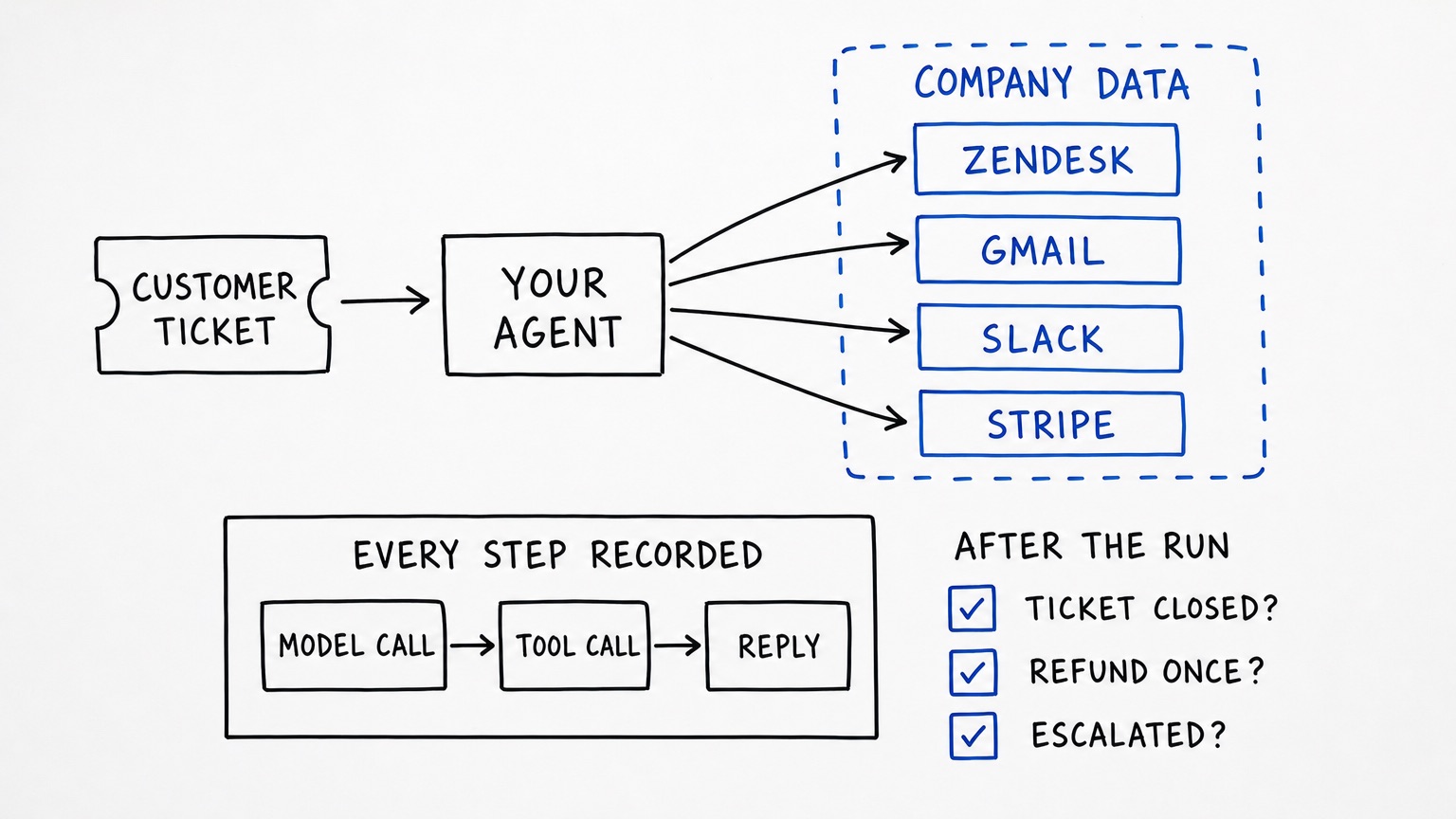
Table of contents
In short
Run the agent against replicas of the apps it works in — a help desk such as Zendesk, email such as Gmail, team chat such as Slack, payments such as Stripe — filled with the company's own customers, tickets, orders and threads, and record every step of the run: each model call, each tool call with its arguments and result, the cost, the failed calls, and every reply that broke a rule you wrote. Then read the state the run left behind: the ticket that closed, the refund that was issued once, the escalation that landed in the right Slack channel.
Redline builds that environment. Its copies answer like the real APIs and hold made-up records written for one company, and each run is kept as a trace you can read back. The Zendesk copy serves 673 operations, the Gmail copy 85, the Slack copy 340. The other four routes teams use today — the help desk's own sandbox, mocked APIs, staging with test credentials, and evaluating transcripts — each answer a different question, and this page compares them from each vendor's and tool's own documentation.
What a support agent has to get right, before the first customer
The reply is the last step of the work, not the work. A support agent that writes "I've refunded the £48 to your card" has changed nothing; the money moves in the refund call behind that sentence, the ticket moves in the update call after it, and a person is pulled in by a chat message somewhere else.
Anthropic's guide to agent evals draws the same line for agents in general: the transcript is the record of what was said and called, while "the outcome is the final state in the environment at the end of the trial" — a flight-booking agent can say the flight is booked, but the outcome is whether a reservation exists in the database. For a support agent, that means four separate things have to be true at once:
| What the agent does | Where it lands | What to check after the run |
|---|---|---|
| Answers the customer | Gmail send, or a public Zendesk comment | The message exists in the right thread, to the right address, and no internal note was sent to the customer |
| Issues a refund or credit | Stripe refund, or a credit on the order | Right amount, right charge, issued once — not twice after a retry |
| Updates and closes the ticket | Zendesk ticket update, comment, tags | Status, assignee and fields end where policy says, including when the agent gave up |
| Escalates to a person | Slack message, Zendesk side conversation | Right channel, right team, and enough context to act on |
| Leaves an internal note | Zendesk comment with public: false |
The customer never sees it, and the next agent can |
None of this is visible in the wording of the reply, which is why testing a support agent means testing the run: the calls, their order, and the state they left.
The four ways teams test a support agent today
Each of these is a real practice with a real purpose. Read together, they show what a replica run adds, and where it does not replace anything.
The help desk's own sandbox
Zendesk's sandbox is a test environment with "the replicated configurations and data from your production environment". Its own documentation sets out what that copy actually contains, and the limits are the interesting part for anyone testing an agent.
- Availability depends on plan: Support Enterprise includes one sandbox, Suite Enterprise and Enterprise Plus include two, and Support Professional and above and Suite Growth and above can buy sandboxes as an add-on.
- You choose how many tickets to replicate, up to 10,000. Closed tickets, non-closed tickets untouched for six months, and everything past a ticket's first 100 comments are not replicated.
- To stop mail reaching real people, "user emails will be invalidated before being added to the sandbox instance by the use of the @example.com domain"; external support addresses are converted to internal sandbox addresses.
- Webhooks are replicated but "deactivated in the Sandbox by default to prevent unintended interactions with the live APIs they're designed to connect to", and API tokens must be recreated.
- Tickets created through the API arrive with their
viatype changed fromvia:apitovia:web. - Custom object records, action flows, personal views and macros, skills-based routing and apps that are not free Marketplace apps without authentication do not come across; side conversations and apps are deactivated on creation.
- Sandboxes cover Zendesk Support and not, for example, Talk or Guide; SMS is not supported.
- Closed tickets are archived after three days, and replication of a full copy "can take up to a week or more". You can replicate at most ten times a month.
- Since 2023, two AI agents are created automatically with a new sandbox, and you can clone agents from production.
That is a good copy of your help desk's configuration, and it is a fair place to point an agent at the Zendesk API. What it is not is a per-case test bed: the state is a snapshot of production rather than a fixture you can roll back per scenario, the emails are neutralised so nothing else in the world reacts, and the run itself is not recorded as an agent run. It also covers one app. A support agent that refunds needs the payment system and the customer's email thread in the same world, and the sandbox has neither.
Mocked help desk and mail APIs
A mock is a server you write, or record, that answers in place of the vendor. WireMock's own documentation describes the two mechanisms teams use: a scenario is "a state machine whose states can be arbitrarily assigned", so one stub answers first and a later stub answers after a state change, with the scenario resettable; and record-and-playback turns real responses into stubs, where "recorded stubs will start being served immediately after recording is stopped".
This is the cheapest way to test your own code: the adapter that builds a Zendesk ticket payload, the retry wrapper around a Gmail send, the error branch when the help desk answers 422. It runs in CI in seconds with no accounts and no keys.
What it cannot do is tell you whether the agent's work was correct. The refund it "processes" changes nothing, so the balance and the ledger cannot contradict it. The ticket it closes has no history, so "was this customer already refunded in March?" has no answer. And each answer is only as accurate as the person who wrote the stub — nothing checks it against the vendor's published schema.
A staging copy with test credentials
Staging means your own deployment, pointed at test credentials, so the paths you actually ship are exercised: environment variables, webhooks, retries, the queue between the agent and the help desk. On the help desk side that usually means a Zendesk sandbox; on the chat side, Slack's developer sandbox, which Slack describes as "an Enterprise org environment ... that can be used to build against all Slack features". Its documented limits decide what a scenario can be: at most eight users per sandbox (bot and app users excluded), two guests, two active sandboxes at a time, a six-month default lifespan that drops to one month of inactivity for a basic sandbox, a template with seven fake users and seven channels, and Slack Connect allowed only between sandboxes.
Email is the awkward one. Google's documented route for trying an app before publication is a test-user list on the OAuth consent screen — "If you selected External for user type, add test users." The scopes a support agent needs are the wide ones. gmail.modify, which is what reading and sending mail on a customer's behalf needs, is a restricted scope; Google's Gmail scope documentation says restricted scopes need restricted-scope OAuth verification, and "if you store restricted scope data on servers (or transmit), then you must go through a security assessment". So the staging mailbox is either a real mailbox holding real mail, or a hand-made account with none of your customers' threads in it.
Staging proves the wiring. It does not give you the records a support case needs: a customer who wrote twice last week, an order that was already partly refunded, a ticket that was escalated and dropped.
Evaluating transcripts and simulated customers
Transcript grading scores what a run did. Anthropic's guide is the clearest public description of the practice, and its worked example is exactly this use case: a support task where the agent must handle a refund for a frustrated customer, graded by an LLM rubric ("Agent showed empathy for customer's frustration", "Agent's response grounded in fetch_policy tool results"), a state check (tickets: {status: resolved}, refunds: {status: processed}), a tool-call check (verify_identity, process_refund with amount: <=100, send_confirmation), and a transcript limit of ten turns.
The same document is honest about the environment, which is the part that matters here. Evaluation "requires running the agent in a real or sandboxed environment where it can use software applications and checking whether it achieved the intended outcome", and "each trial should be 'isolated' by starting from a clean environment", because leftover state "can cause correlated failures due to infrastructure flakiness rather than agent performance", and "shared state can also artificially inflate performance". It also warns that grading a fixed sequence of tool calls is brittle — "it's often better to grade what the agent produced, not the path it took" — recommends partial credit (an agent that verifies the customer and then fails the refund is better than one that fails at once), and notes that a second LLM often plays the user, as in the τ-Bench and τ2-Bench simulations of retail support conversations.
Two more points from that guide apply directly to customer-facing agents: the pass^k metric, which asks whether all k trials succeed (at a 75% per-trial success rate, three trials all pass about 42% of the time) and matters "for customer-facing agents where users expect reliable behavior every time"; and the advice to start with "20-50 simple tasks drawn from real failures".
An eval suite is the right way to judge choices across many runs. What it cannot do is conjure the environment: a transcript of a refund against a stub shows the agent decided to refund, not that a refund was possible, correct and singular. That is why evals and replicas fit together rather than compete — the replica is the environment the transcript is graded against.
What running the agent against replicas looks like
Redline serves copies of the provider APIs, each company gets its own copy of every fake API, and the records in them are written for that company only. The build rule in the repo is that a copy must be an exact replica of the real API — "same URLs, parameters, bodies, answers, errors, headers, IDs and behaviour. Only the data is fake" — generated from the provider's published spec, with a watcher that reports when that spec or its documentation pages change.
The copies a support agent touches, and what each copy's own test suite reports:
| Copy | Operations served | What the repo reports |
|---|---|---|
| Zendesk | 673 (662 Support, 11 side conversations) | 673/673 operations answer as the spec says; 111 documented-only endpoints answer as their pages say; 2,460 recorded unauthenticated answers identical to support.zendesk.com; 656/656 generated tools build their request |
| Gmail | 85 | 85/85 operations pass; 21/21 behaviour checks (search, delivery, filters, vacation); 246/246 recorded answers identical; Google's own @googleapis/gmail client 13/13 |
| Slack | 340 | 340 methods, 374/374 checks; 18/18 behaviour checks; 1,043 recorded answers identical; @slack/web-api 19/19 |
| Stripe | 612 | 612/612 operations answer as the spec says; 80/80 behaviour checks, including captures, refunds, asynchronous refunds and idempotency; 1,242/1,242 recorded answers identical |
Three things make that useful for a support agent.
The records are the company's own. The data agent writes a company's records as files in the company folder, one folder per app and one file per record kind, in exactly the format that app's API returns. The volumes are parameters, not guesses — for Gmail, four messages per person per working day with 30% of them from customers; for Slack, ten channels and ten messages per person per working day; for Stripe, a refund rate of 8%. A shared world file keeps the facts the apps must agree on, so the order the agent refunds is the same order named in the ticket, the customer keeps one email address across Gmail, Zendesk and the payment system, and the escalation names a Slack user who exists. Everything is made-up data on .example domains, so no production record is anywhere near a test.
Every step is recorded. The agent sends its runs to the company's Redline project with the @redlineai/sdk, whose tracing API is Langfuse's: observe() wraps a model call or a tool as a span, propagateAttributes({ sessionId }) keeps one conversation together, and the console shows tokens, cost, failed calls and what a month of runs will cost. Rules are separate and written by you: the site's description is "Write what your agent must not do. Each run is read against it, and every reply that breaks it is kept with its words and the reason." A run that ends with the ticket closed, a refund issued and a Slack ping is one session, with each model call's request, tools and reply in order.
The state is there to act on, and you can put it back. A refund in the copy moves the balance; closing a ticket in the Zendesk copy keeps its comments and status; POST /_twin/reset returns a copy to its seed and GET /_twin/coverage says what it serves, so the same case runs again from the same starting state. Agents sign in on the copy's own "Agent Sandbox" account chooser — the Zendesk copy takes an API token of the form {email}/token:{token} and lists its sandbox keys at /_twin/zendesk/keys — so nothing reaches a real workspace.
A single run then reads like this: a Gmail thread arrives from a customer asking for a refund on an order that shipped late; the agent calls the order tool, reads the ticket in Zendesk, checks policy, calls the refund, replies in the thread, writes an internal note, sets the ticket to solved, and posts to the escalations channel because the amount is above its limit. Afterwards you can check the amount, that the refund exists once, that the note is internal, that the ticket's status is solved, and that the message went to the escalations channel — and you can read which call it made first, and what it cost.
How the routes compare
| Route | What the agent acts on | Whose records | What you keep afterwards | Where it stops short |
|---|---|---|---|---|
| Help desk sandbox | Your Zendesk configuration and up to 10,000 replicated tickets | A snapshot of production | A configuration copy; agent-side logs of your own | One app, snapshot state, emails neutralised, no per-run record |
| Mocked APIs | Responses you wrote or recorded | Stubs | A fast, deterministic suite | No state to be wrong, no cross-app facts, accuracy unverified |
| Staging on test credentials | Your deployment plus vendor test environments | Test accounts and hand-made objects | Wiring evidence | Real mailbox or an empty one; records still missing |
| Transcript evals | A recorded or freshly run agent, wherever it ran | Wherever the run happened | Scores, regressions, graded traces | Cannot show what the environment would have done |
| Replicas with the company's records | Stateful Zendesk, Gmail, Slack and Stripe copies | Records written for that company | Every step, cost, failures, rule breaks, resettable state | Not the vendors; made-up data; some behaviour unverified |
What the replicas do not do
Fair limits, from the copies' own READMEs and from the size file:
- They are not the vendors. No email leaves the copy, no customer is contacted, no money moves. Keep a Zendesk sandbox to validate configuration changes, and keep vendor test credentials for verifying your integration against the real API.
- Some answers are not verified against signed-in traffic. No request with a valid key was sent to real Zendesk, so the wording of validation errors for signed-in calls, ticket and object id formats, key order for types without a recording, and webhook details are the copy's own choices. Similar gaps are listed for Gmail (authenticated error texts, some payload details, id formats, whether "PST" in search means Pacific time with daylight saving) and for Slack (some admin error codes, analytics counts the copy cannot know).
- Not everything is in the copies. Gmail's
users.watchstores the watch but cannot publish to Google Pub/Sub, and Google's HTTP batch endpoint and resumable uploads are not implemented. Slack's Audit Logs, SCIM, Legal Holds and Admin Oversight APIs are not in the Slack copy, and it is not the Slack client. The Zendesk copy lists two public apps rather than the real Marketplace, and its webhook subscriptions coverconditional_ticket_eventsrather than every Zendesk event. - Ticket volume for Zendesk is not a default. The data agent's default sizes cover Gmail, Slack, Stripe, HubSpot and Salesforce, but
sizes.jsonhas no Zendesk entry, so a Zendesk copy's ticket volume has to be given in the request'sSize:line rather than inherited. - It is not production data. The records are made up for the company. If one real case matters — the customer who wrote three times, the order with the odd partial refund — write that record into the company folder by hand rather than exporting production records.
A week's worth of steps
- List the actions, not the prompts. Write down every write action the agent may take — send, comment, note, status change, refund, credit, escalate — and the API each one lands in.
- Write the cases from real failures. Anthropic's advice is to start with 20-50 tasks drawn from real failures; for support agents, that means the tickets your team already knows are hard.
- Fill the company's records. Give the data agent the business, the domain and the apps; its world file keeps the customer, order and thread consistent across Zendesk, Gmail, Slack and Stripe.
- Write the rules before you run. "No refund above £100 without a person", "never email an internal note", "always reply in the customer's language", "escalate a second complaint from the same customer".
- Run each case from a reset copy, with the SDK instrumenting the agent, and keep the trace.
- Grade the state and the transcript. A state check for the ticket and the refund, a tool-call check for identity verification and the amount, a rubric for tone, and a limit on turns.
- Re-run the whole set on every prompt or model change — the point of a recorded run is that last week's result is comparable with this week's.
Related reading on this site: how to test a payment agent before it touches real payment systems covers refunds, disputes and idempotency in depth; how to test an AI agent for security before deployment covers the pre-release method; and approval gates and scoped credentials covers the controls that stop a support agent acting outside its remit.
Common questions
Does a Zendesk sandbox test an AI support agent?
Partly. A sandbox is a copy of your configuration with up to 10,000 replicated tickets, and Zendesk creates two AI agents in it, so it is a reasonable place to check that your agent's Zendesk calls behave and that your triggers, fields and forms work. It does not give you the rest of the case: the customer's email history, the payment, the Slack escalation, a reset per scenario, or a record of the agent's own steps. Zendesk also documents what does not replicate — custom object records, action flows, personal macros and views, apps that need authentication or configuration, and closed tickets.
Can we point the agent at real customer tickets instead?
That is production, with real customers on the other end, and it is the thing you are trying to avoid while the agent is unproven. It is also awkward on the email side: Gmail has no separate test environment, and the scopes a support agent needs are restricted, which per Google's documentation require restricted-scope OAuth verification and a security assessment when that data is stored or transmitted on your servers. A replica keeps the shape of the work — customers, orders, threads, ticket history — without production records leaving your systems.
Do mocks and evals become unnecessary once there is a replica?
No. Mocks stay the cheapest way to unit-test your adapter code and to run fast in CI; eval suites stay the way to grade decisions across many runs and catch regressions. What changes is what the eval grades: with a stateful copy underneath, "the agent handled the refund correctly" is a claim about a balance and a ticket status rather than about a response body someone hand-wrote.
Do we need every app replicated, or just the help desk?
Just the apps in the case. If the agent only reads and updates tickets, a Zendesk copy covers it. The moment it writes an email, moves money, or pulls a person in, the run crosses into other systems, and a case that stops at the help desk boundary cannot show whether the customer was told the truth or whether the escalation reached anyone.
How do we stop one scenario from affecting the next?
Reset between runs: POST /_twin/reset returns a copy to its seed and GET /_twin/coverage shows what it serves. Each company also has its own copy of every fake API, so one team's runs do not touch another's data. This is the same point Anthropic makes about eval trials — shared state between runs can cause correlated failures or inflate results.
Sources
- Zendesk, About Zendesk sandbox environments — plan availability, ticket replication up to 10,000, invalidated emails, deactivated webhooks, API tokens,
viatype, what does not replicate, Talk and Guide exclusion, SMS, archiving, replication time and monthly limit, automatic AI agents. - Slack, Developer sandboxes — Enterprise org environment, templates, user and guest limits, lifespan, archiving, Slack Connect between sandboxes, intended use.
- Google Workspace, Configure the OAuth consent screen and choose scopes — test users for external apps, scope categories and reviews.
- Google, Choose Gmail API scopes —
gmail.modifyand other restricted scopes, verification and security assessment. - WireMock, Stateful behaviour — scenarios as state machines and resetting them.
- WireMock, Record and playback — recording stubs from real responses and serving them after recording stops.
- Anthropic, Demystifying evals for AI agents — transcript versus outcome, the refund example and its graders, isolated trials, grading the outcome rather than the path, partial credit, pass^k for customer-facing agents, 20-50 tasks from real failures, simulated users in τ-Bench.
Replicas of Slack, Gmail, Jira and more, filled with your company's data, to test your agent before production.
Run a simulationRelated